

The HTML and iframe macro for Confluence Cloud
Embed websites, dashboards and custom HTML, CSS or JavaScript directly in your Confluence pages. Everything runs in a secure sandbox your admins control.
Team dashboard
- 5.0 on the Atlassian Marketplace
- Cloud Fortified
- 1,400+ installs
- EU hosted, sandboxed by design
Confluence Cloud has no built-in HTML macro. This is the fix.
The HTML macro you knew from Confluence Server and Data Center is not available in Confluence Cloud. Atlassian removed it for security reasons, which left teams with no way to embed an iframe or run custom code on a page. HTML Macro Pro brings that capability back, rebuilt for Cloud: the code runs in an isolated sandbox instead of the page itself, and administrators decide exactly what is allowed.
Server / Data Center
HTML macro built in
Confluence Cloud
HTML macro removed
HTML Macro Pro
Sandboxed and admin-controlled
Embed anything. Stay in control.
Embed websites and iframes
Paste any URL and it renders on the page. The iframe resizes to full width automatically, with configurable height. Dashboards, docs, prototypes, status pages.
Read the guideRun custom HTML, CSS and JavaScript
Paste raw code into the editor with syntax highlighting. It executes inside an isolated frame, never in the Confluence page itself.
Read the guidePaste AI-generated widgets
Ask ChatGPT or Gemini for a calculator, chart or countdown, paste the code, publish. HTML Macro Pro is the fastest way to ship AI-built widgets to Confluence.
Read the guideGive admins the keys
Content Security Policies decide what can load, with a library of predefined rulesets. Group permissions decide who can use the macro at all.
Read the guideWorks with the tools your pages already need
Embed Power BI dashboards, Figma files, Google Drive documents, Excel sheets, Looker Studio reports and YouTube videos in seconds.
Some services block embedding on their side via their own security policy. If a site refuses to load, that restriction comes from the provider, not the macro.
On your page in under a minute
- 1
Type
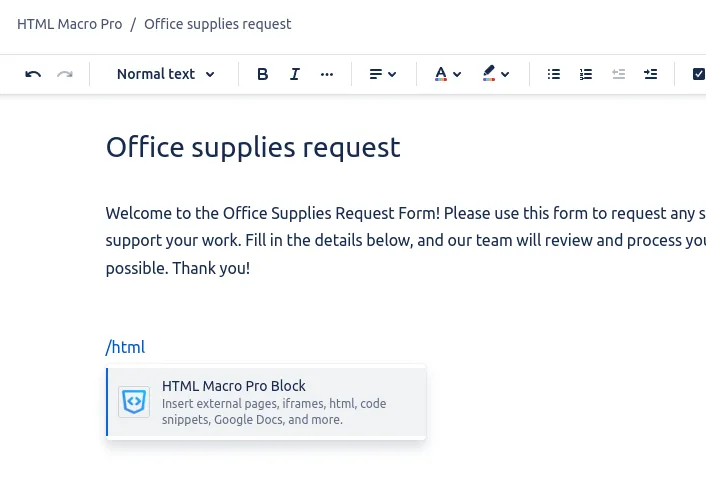
/htmlAdd the macro anywhere on a Confluence page with the slash command.
- 2
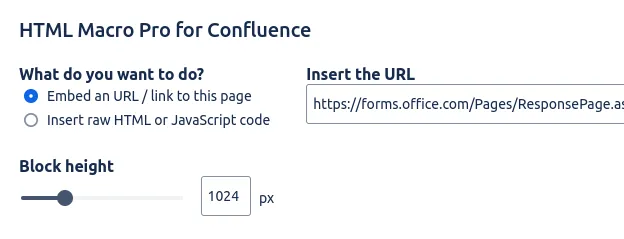
Paste a URL or your code
Choose website mode or code mode. Set the height if you want to.
- 3
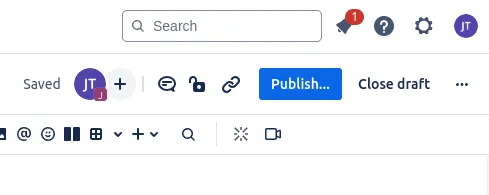
Publish
The content renders in a sandboxed frame. Resize, duplicate or remove it anytime.
Secure by design, not by promise
Custom code on a wiki page is only acceptable if it cannot touch anything else. That constraint shaped the whole product.
Isolated sandbox
Embedded content runs in a cross-domain frame. It cannot read Confluence cookies, storage, the page DOM or your session. Even buggy code stays confined.
Admin-defined CSP
Administrators allow or block resources per policy, starting from predefined templates for common tools.
Group permissions
Restrict who can add the macro to a page, per Confluence user group.
Nothing personal stored
Only the URLs and code you enter are saved, hosted in Frankfurt, Germany, with no PII in logs. Cloud Fortified and part of Atlassian's Marketplace Bug Bounty program.
Frequently asked questions
Is it safe to run custom HTML in Confluence?
Why is there no HTML macro in Confluence Cloud?
Can I embed JavaScript in Confluence?
Can I embed Power BI or other dashboards in Confluence?
Why does a website refuse to embed?
What happens if I uninstall the app?
Does it work on Confluence Server or Data Center?
Put your first embed on a page today
Free on the Atlassian Marketplace. 5.0 rated. Cloud Fortified. Set up in minutes.