
Troubleshooting
Fix common HTML Macro Pro issues in Confluence: CSP violations, blocked embeds, permission errors and content that does not render.
Content Security Policy violation
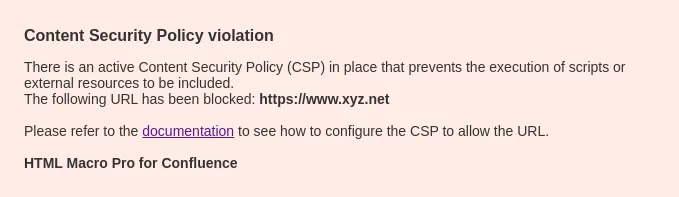 A Content Security Policy violation error.
If you encounter this error while loading a Confluence page containing our Macro, it means that certain restrictions have been applied to what the Macro is allowed to do. This typically occurs when the Macro attempts to embed an external website (e.g., within an iframe) and the source has not been explicitly approved in the Macro settings. The banner names the blocked resource (“The following URL has been blocked: …”), which tells you exactly which host to allow. If you are a Confluence Administrator, please follow the steps outlined in the Managing security section and add a rule for that host (see Content Security Policy).
The Macro does not load
 Example captured from the app: the placeholder the macro shows when content cannot load (not a broken image on this page).
This behavior can happen for mainly three different reasons:
- The Macro attempts to load a URL that does not exist (404 error).
- You do not have permission to load the URL (403 error).
- Most likely, the website refuses to be embedded. Some websites, SaaS platforms, or other external services may enforce a Content Security Policy (CSP) that prevents embedding their content into any other platform, including Confluence pages. In the latter case, there is unfortunately nothing we can do. This restriction is beyond our control and cannot be bypassed. If embedding the content is critical to your workflow, we recommend reaching out to the website or service provider to inquire about whitelisting for embedding purposes.
Access denied when inserting the macro
If you see this message in the editor:
Sorry, it seems like you don’t have access to this Macro. Please contact your Confluence administrator to request access.
your site restricts the macro to selected Confluence groups, and your account is not in one of them. Ask your administrator to add your group on the User Permissions tab: see Managing security.
The app does not have access to this page
A warning panel saying “Looks like the app HTML Macro Pro for Confluence does not have access to this page.” means page restrictions, space restrictions or global permissions exclude the app user. Fix it by granting the app access in the page’s restrictions or the space’s permissions.
My code works in my AI tool but not in the macro
The sandbox blocks some browser APIs that work in a normal tab: WebSockets, Service Workers, Web Workers, clipboard access, geolocation, fullscreen, camera, microphone and notifications, among others. Code that relies on them fails silently. The Generate with AI page lists every restriction and the working replacement for each.
Content is cut off or scrolls
The macro block has a fixed height; content taller than the block scrolls inside the frame. Open the macro configuration and raise the Block height (0 to 4000 px).
App installation timed out
Right after install you may see “App installation timed out. Please reload the page.” Forge provisioning can take a moment on first run. Reload the page and the macro will work.
Copy to clipboard, fullscreen or notifications do not work
That is expected: the sandbox does not delegate the clipboard, Fullscreen or Notification APIs to embedded content. See Generate with AI for the full list of sandbox restrictions and the patterns to use instead.
Still stuck?
Contact support and include the page URL and a screenshot of the error. We are happy to help.
Add HTML Macro Pro to Confluence
Securely embed websites and custom code in your Confluence pages.